Joining the unit is a straight forward process, firstly you will need an invite from one of our pre-existing members. This will grant you access to our Discord server, which is where the required files to join our game server are available.
[1] Inside the #modpack channel on the Discord Server, download the latest modpack file.
[2] Go into steam and open up the Arma 3 Launcher
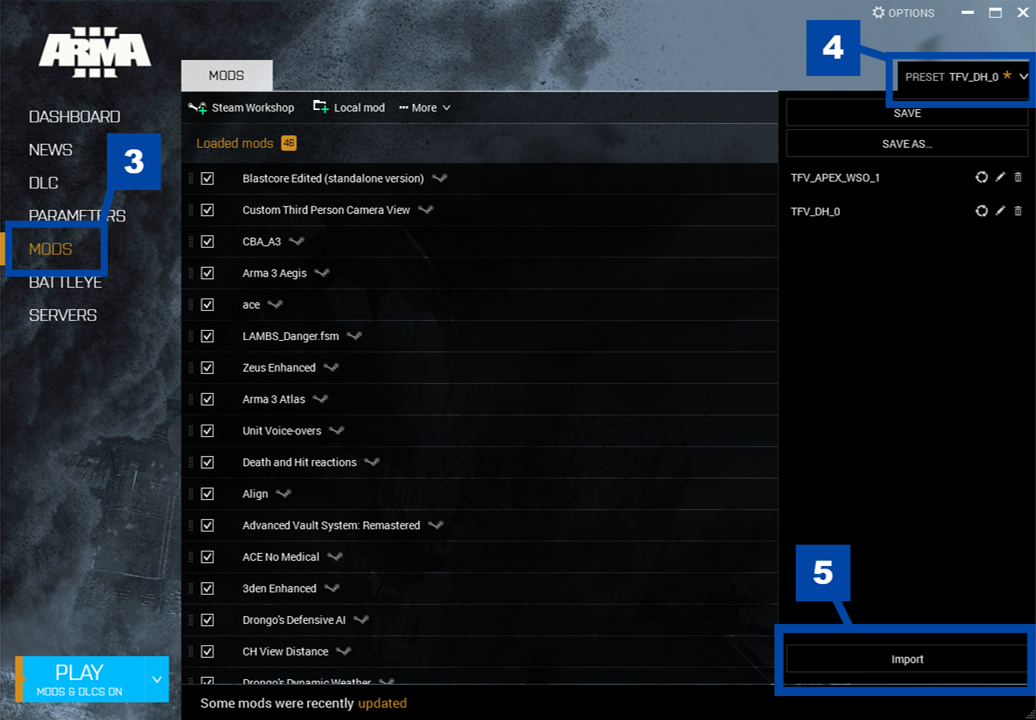
[3] Inside the launcher navigate to the "MODS" tab
[4] Select the "PRESET" option in the top right
[5] Click the "IMPORT" option, a file explorer window will open up. You will need to choose the modpack file that was downloaded in step 1
[6] The launcher will ask you to subscribe to a list of mods, select the "Subscribe to All" option!
Congratulations, you have now started the installation of the TFV modpack! Until you get to joining the server, you will be able to complete the rest of the setup process while the download continues in the background
[1] Inside the #modpack channel on the Discord Server, download the latest TFAR plugin file.
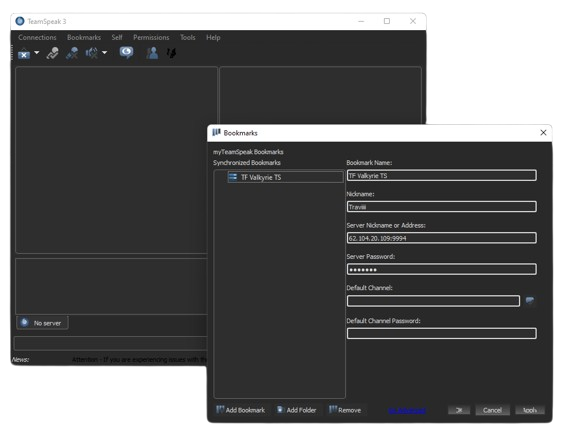
[2] Open up Teamspeak 3 and press 'CTRL + B', this will open up the bookmarks menu.
[3] Inside the bookmarks menu, add a bookmark and fill in the information with the server details within the #modpack discord channel.
[4] Exit the bookmarks menu and press 'ALT + P', this will open up the options menu, you can now configure your input/output devices.
[5] Open a new file explorer window and double click on the TFAR plugin you installed earlier on. This will prompt you to install the TFAR plugin, restart Teamspeak and the plugin will be applied.
The TFAR plugin is now installed, this is the mod that handles proximity and radio based chat inside of the game.
You have now completed the initial setup for the modpack! Once you load the game you will be able to successfully connect to the server from the multiplayer menu. If you need help with learning the game, there is more information available within the bootcamp section of this site, or you can message a staff member for some one-on-one training!